Someone searches Google for a proximal tibia plate, and the first result from the company that makes it is a PDF. It opens on page one of a forty-page catalog; they scroll down to the table where the product appears, and that's where they stay: from the file, there's no way to see the rest of the family, the surgical technique guide, or anything else on the site. That product has its own page. Google chose the catalog.
Why Google picks the file
At medical device companies, the PDF catalog is often the most complete document there is on a product line. It has the trade names, codes, sizes, and variants, and it has been on the site for years, linked from distributors, congresses, and emails. Many product pages, by contrast, were built with a name, a photo, and a download button. For Google, the text that answers the search is in the file.
That matters because people who don't know the brand search for exactly that. At SAI, an Argentine orthopedic manufacturer and distributor, about 90% of the clicks from the site's top 1,000 queries come from searches that include the company's name, but unbranded searches account for half of the impressions. They're queries for a procedure, a code, a family, or a surgical technique guide in PDF: people who don't yet know who to buy from.
How to see it on the company's own site
In Search Console, the Performance report by page mixes everything together. To see the problem, two groups of URLs have to be separated: those ending in .pdf and those that follow the product page pattern, for example, those starting with /productos/. With a page filter for each group, the clicks each one gets over the same period become visible.
Two other checks are useful. The first is to open each catalog with a lot of clicks and look at the queries people arrive with: if the name of a product with its own page shows up, that search is ending up in the wrong place. The second is to count how many product pages got at least one click in the period and compare that with the full catalog. The gap between the two numbers is the part of the catalog Google isn't showing.
What changes when the information moves to the product page
The product page starts to compete when it has what the PDF had: name, codes, family, anatomical region, indications, and the documents that belong to it, on the same page. The catalog is still available for anyone who needs the full line, now as a download from the product page. The old URLs of PDFs that were getting visits are redirected to their new destination, so what they had already earned isn't lost.
At SAI, the catalog of nearly 270 products was organized into five navigation dimensions (area of interest, anatomical region, product type, procedure, and brand), and before the August 10, 2026 launch we audited 511 redirects through to their final destination, with none broken. We then compared two 39-day windows around the launch, using Search Console data pulled on September 19, with product pages separated from catalog PDFs.
- Clicks on product pages1,3083,227
- Clicks on catalog PDFs1,391324
- Product pages (in Spanish and English) that got at least one click348577
Product pages got two and a half times as many clicks, and catalog PDFs dropped 77%. The third row is the most telling: 229 more product pages started getting clicks. The increase wasn't limited to product pages that were already performing; a part of the catalog that hadn't been visible until then started appearing.
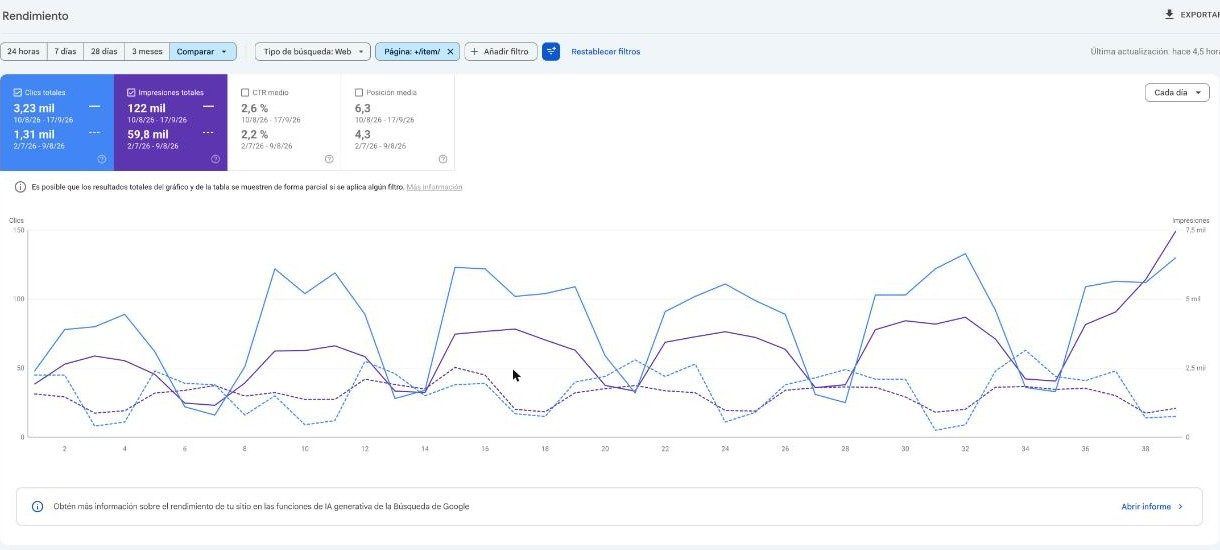
Across the whole site, organic clicks grew 41.3% between the two windows, and impressions grew 18.3%. Visibility on Google grew much less, yet resulted in many more visits. Someone searching for a retrograde tibial nail reaches the product, its family, and its documentation; someone searching for a surgical technique guide still reaches the file, inside the library where it belongs.
Why look at 30, 90, and 180 days
A migration shifts search results for a while. Google crawls the site again, replaces the old URLs with the new ones, and for a few weeks may show both. That's why the same comparison says different things depending on when it's done.
At one month, it helps find what broke: redirects that don't land, PDFs that still appear instead of the product page, products that haven't been indexed yet. At three months, reindexing is over, and it shows whether the change in entry points holds up. At six, the numbers can be compared with the same time the previous year, which matters in an industry where congresses, courses, and tenders change quite a bit what people search for.
The figures in this article correspond to the first of those reviews: 39 days after the launch.
Services covered in this article