Three weeks before the new site goes live, someone exports the pages that got clicks in the past year from Search Console. At the top of the list, between the home page and the contact page, are several PDFs: the catalog for a knee line, a spine surgical technique guide, a table of codes. On the new site, those URLs don't exist.
A migration loses rankings when the URLs Google already knows stop leading to something equivalent. At a medical device manufacturer or distributor, many of those URLs aren't in any menu.
The inventory starts outside the menu
The page list in the admin shows only what was added through the content management system. Search Console provides the URLs that get impressions and clicks, including the ones nobody links to. Analytics shows which pages people land on. The current redirect rules hold the paths from a previous site, which still get visits. And the server folders contain the files someone uploaded by hand.
On top of that are the URLs that live in print or are saved outside the site: QR codes on labels and IFUs, printed catalogs with a URL on the back cover, links in congress presentations and in emails distributors have been forwarding for years. Those have to be requested from each team.
The result is a spreadsheet with one row per URL: what it delivers today, how many visits it gets, what language it's in, and, once it's known, where it will go.
The redirect map, row by row
Each old URL has to lead to the new page that serves the same purpose. A product page goes to the same product's page, a category to the equivalent term in the new catalog, a page in English to its English equivalent. Sending everything to the home page avoids the 404 error but loses what that URL had earned, and someone looking for an implant ends up looking at the main banner.
When there are patterns, a single rule can handle hundreds of URLs at once, for example an entire folder of IFUs. Redirects that don't follow a pattern are written one by one. If the site has been through earlier migrations, the old rules are updated to point straight to the final destination instead of chaining one redirect after another. And it's best for all of them to live in one place: two redirect systems active at the same time can send the same URL to different destinations.
Deciding what happens to each PDF with traffic
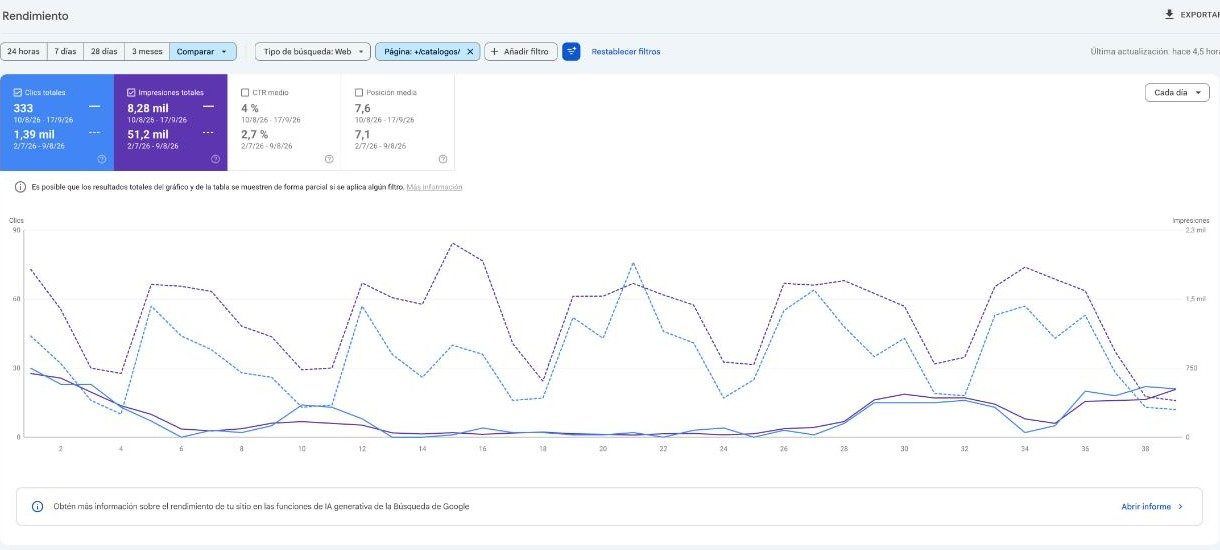
In this industry, the PDF catalog is often the most complete document about a product line, and Google knows it. At SAI, an Argentine orthopedic manufacturer and distributor, the PDF redirects were built using Search Console data. In August 2026, with the new site already live, 80 catalog PDFs accounted for nearly a quarter of the impressions on the site.
Each PDF with visits has three possible outcomes. If its content moved to a product page, the old URL leads to that product page, and the PDF remains available for download from there. If the document is still used as-is, like a surgical technique guide, its URL is kept or redirected to its new location. If the document should no longer be published, because it was replaced by a new revision or the product was removed from the catalog, it's taken down and its URL leads to the product page or family that replaces it. The company decides which version of each document is still current; the map carries out that decision.
What gets tested on the day of the switch
The test uses a sample of old URLs of each type: a product page, a category, a catalog PDF, a surgical technique guide, a page in each language, and the URLs printed on QR codes. Each one is followed to its final destination, from a logged-out browser, and that destination is compared with the one in the spreadsheet.
The response code isn't enough. In an audit of SAI's redirects, 34 of 41 faulty rules responded without any error code while sending visitors browsing in English to pages in Spanish.
That same day, a few other things a migration tends to leave behind get checked: that the new site is no longer blocked from search engines, as the staging site was; that the sitemap with the new URLs has been submitted to Search Console; that each page declares its equivalent in the other language; and that measurement was carried over to the new site. If a contact form changed URL, the event that tracked it has to change too; otherwise, the new site will appear to get fewer inquiries.
Every risk with an owner
A migration plan names risks before going live: PDFs that will compete with the new product pages, legacy rules nobody reviewed, documents without an owner. Naming them isn't enough. If no one is responsible for a risk and it has no date before the day of the switch, it comes back once the site is live, with real traffic on it.
After launch, Search Console's “Not found (404)” report shows the URLs that were missed in the inventory, and each one is added to the spreadsheet. We explain how to review a site that's already live, without taking it offline, in How to audit a medical device website while it keeps running.
Services covered in this article